
ClaimWise: Class Actions
ST AdvancedTools
4.2876.00 Reviews
- Version
- 1.0.62
- Installs
- 100.00K
- Age Rating
- Everyone
Screenshots


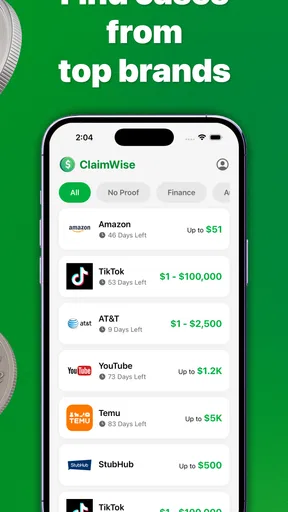
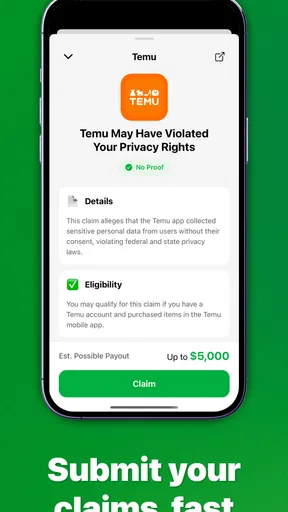
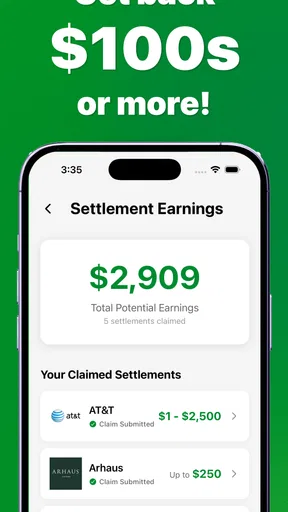
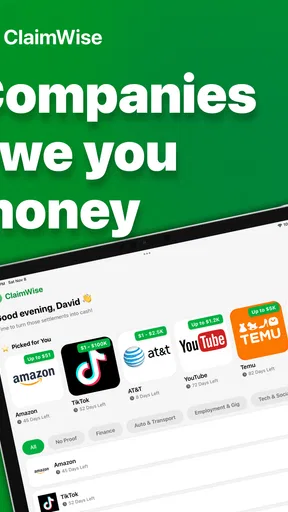

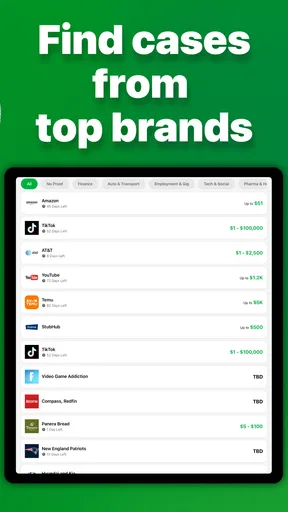
Our Review of ClaimWise: Class Actions
 Analysis by Appyee
ClaimWise: Class Actions takes a very specific approach to a problem many people ignore: money may be available from class-action settlements, but finding out about it and deciding whether to file can be surprisingly difficult. I reviewed this free tools app from ST Advanced with that narrow purpose in mind. Its central promise is simple—help users discover potential claims and take the next step—but the practical value depends on how carefully you read each opportunity rather than treating every listing as guaranteed money.
That distinction matters. This is not a budgeting app, a banking service, or a shortcut to instant payments. It is better understood as a discovery and claim-follow-up tool for people who would otherwise never hear about relevant settlements. The app is available to everyone by age rating, supports devices running Android 7.0 or later, and its current version is 1.0.62. I found the concept appealing because it turns a task that is easy to postpone into something I can check in a few minutes, while still leaving the important eligibility decisions in my hands.
Finding possible settlements is the app’s real strength
I’d use this section to look at the step before a claim is filed: how a discovery-focused app can help someone notice an opportunity, then decide whether it deserves further attention. I’ll also consider the practical role of a steady connection in checking current information, since settlement details and deadlines are the kind of things I would want to verify rather than rely on from memory. That leads naturally to the question of where the app fits into an ordinary routine.
Why this capability is useful
The most important capability here is not a complicated financial feature. It is the attempt to put potential class-action claims in front of ordinary users before the filing window passes. Companies may owe money through settlements, but that does not mean affected customers will automatically receive it. In many cases, a person must recognize the case, meet the requirements, submit a claim, and keep track of the deadline. ClaimWise focuses on making that discovery step more visible.
In my experience, this is where the app makes the biggest difference. Without a dedicated place to look, I would rarely search for settlements on my own. I might notice a news story or an email from a company, but I would not regularly visit several official settlement websites to see whether I qualified for anything. A focused app changes the habit from “I should investigate this someday” to “I can quickly check what may be relevant now.”
The wording around possible payments should still be read carefully. A claim is not the same as an approved payout, and submitting a form does not guarantee that money will arrive. The practical benefit is access to opportunities and reminders to investigate them, not certainty. That is why I see the app as a filter for attention rather than a replacement for the official settlement administrator or legal notice.
What I would look for before filing
When I encounter a settlement through an app like this, I do not begin with the advertised amount. I first check the basic eligibility language: which product or service is involved, what dates matter, which locations are included, and whether proof of purchase or other documentation is required. Those details often decide whether a claim is worth pursuing.
A useful habit is to treat every listing as a lead. I would open the case information, compare it with my own records, and note the deadline before doing anything else. If the claim concerns an old subscription, purchase, or account, I would search email receipts, bank statements, order histories, or archived account messages. This workflow is more reliable than filing based on a vague memory that I may have used a company years ago.
The app is most valuable when it turns awareness into a deliberate verification routine. That is a less exciting benefit than the idea of getting paid, but it is the one that protects users from wasted time and incorrect claims. It also makes the service more useful for people who are organized enough to follow through but not interested in becoming experts in settlement notices.
How it fits with the usual alternatives
The usual alternative is doing everything manually: searching the web, checking consumer news, reading email notices, and visiting official settlement pages one by one. Manual research can be more authoritative because it takes you directly to the source, but it is also easy to abandon. ClaimWise offers a more convenient starting point by bringing the discovery process into a tool designed for this particular task.
Another alternative is relying on social media posts or forwarded messages. That can expose users to opportunities, but it also creates confusion. Posts may be outdated, omit eligibility conditions, or point toward unofficial pages. I would rather use the app to identify a case and then confirm the details through the relevant official information before sharing personal details or submitting anything.
Compared with browser bookmarks, the advantage is focus. A bookmark folder does not actively encourage a regular review habit, while a dedicated claims app makes the subject easier to revisit. Compared with a general personal-finance app, the difference is even clearer: budgeting tools help manage money I already have, whereas this app is aimed at identifying possible money I may be entitled to claim.
How the process feels in everyday use
My recommended routine is short and repeatable. I would open the app during a weekly admin session, scan the available opportunities, and separate them into three groups: clearly relevant, possibly relevant, and not relevant. For the first group, I would record the deadline and gather supporting information. For the second, I would read the eligibility language more closely before deciding whether to continue. The last group can be ignored without turning the process into a research project.
This approach avoids one of the common mistakes with settlement services: spending too much time chasing tiny or uncertain claims. If a case requires extensive documentation that I do not have, I would weigh the effort against the likely benefit. If the process is straightforward and I can verify that I qualify, filing may be sensible. The app can help me notice the opportunity, but it cannot make that personal cost-benefit decision for me.
I would also keep copies of anything submitted and note the confirmation details in a separate place. That is a practical safeguard because the app should not be treated as the only record of a claim. If a settlement later asks for clarification, having the case name, submission date, and documents nearby can save frustration.
Where ClaimWise helps most—and where I would be cautious
Here I’ll weigh convenience against the care these claims require, including how I would handle uncertain eligibility, personal records, and any paid option. A useful way to judge the app is to ask whether it saves enough effort to justify adding another stop to your process—or whether direct research through official case information is simpler for you. That trade-off also shapes when I would reach for it on a phone and when I would leave the task for later.
The best everyday scenario
The strongest use case is a person who has used many consumer services over the years but does not actively follow legal news. Imagine checking the app after receiving a notification or remembering an older purchase. Instead of trying to reconstruct every possible settlement from scratch, that person can review relevant opportunities in one place, match them against old receipts or account records, and decide whether to file.
It is especially practical for households where different people remember different purchases. One person may handle streaming accounts, another may manage online shopping, and someone else may keep subscription emails. A shared review of possible claims can uncover information that would otherwise remain scattered. I would still avoid entering another person’s details without their knowledge, but the app can prompt a useful conversation about records and eligibility.
There is also value for people who are not confident with legal language. Settlement notices can be dense and full of conditions. A dedicated discovery tool may make the first step less intimidating, giving users a reason to investigate instead of closing the notice immediately. The important boundary is that convenience should not replace reading. Plain-language discovery is helpful; skipping the official terms is risky.
The tradeoff between convenience and certainty
The biggest limitation is built into the category. No discovery app can determine every user’s eligibility without accurate personal history, and no app can promise that a claim will be accepted simply because it appears relevant. I would therefore be uncomfortable using ClaimWise as the sole authority for a legal or financial decision. For anything important, I would verify the case through the official settlement channel.
There is also a possible attention problem. Seeing many potential claims can create the impression that filing is always worthwhile. In reality, each opportunity has its own deadline, documentation rules, and distribution process. Some users may spend more time tracking possibilities than the eventual result justifies. The best way around this is to set a personal threshold: pursue claims that are clearly relevant and reasonably easy to document, while skipping those that demand disproportionate effort.
Privacy deserves a cautious approach as well. Claim forms can request personal information, and the safest workflow is to understand exactly where that information is being submitted. I would not share sensitive details merely because a listing looks promising. I would follow the official instructions, check that the destination is legitimate, and avoid treating a convenient in-app path as proof that every request is necessary.
What the cost structure means
ClaimWise is free to download, which lowers the barrier for someone who only wants to explore the service. At the same time, the app includes in-app purchases ranging from $5.99 to $89.99 per item. That makes it important to understand what is included at no cost and what may require payment before committing to any paid option.
For my own use, I would begin with the free experience and judge whether it provides enough value for occasional checking. I would not pay simply because a settlement appears to offer a large potential amount. Any purchase should be evaluated separately from the claim itself, with attention to whether the cost is clear and whether the service adds meaningful convenience over using official resources directly.
This is one situation where a different option may be better. If I already have a reliable system for tracking consumer notices, or if I am comfortable researching settlements through official websites, I may not need an additional paid layer. On the other hand, someone who repeatedly misses deadlines because they never sees relevant notices may find convenience more valuable than a person who already monitors these matters closely.
Who gets the most from it
ClaimWise is a good fit for casual users who want a focused way to discover potential class-action opportunities without building their own research routine. It may also suit people who have many old purchase records, subscriptions, or service accounts and are willing to check eligibility carefully. The app’s Everyone rating makes it approachable for a broad audience, although younger or less experienced users should involve a trusted adult before sharing sensitive information or making paid decisions.
The developer, ST Advanced, has positioned the product in the tools category rather than presenting it as a financial institution or legal adviser. I think that framing is appropriate. The app’s role is practical and limited: help me notice possible claims, organize my attention, and encourage me to investigate. It should not be used to replace legal advice, official case information, or my own judgment about whether a claim is accurate.
People who want guaranteed payments, instant transfers, or a fully automatic filing service should skip it. The app cannot remove the need to read terms, confirm eligibility, collect records, and complete the official process. It is also not the right choice for someone unwilling to inspect privacy requests or who expects every listed opportunity to apply personally.
My final take after weighing the workflow
The app has a clear purpose, and that focus is its main advantage. With a 4.2 average from around 1.9 thousand ratings and more than 100 thousand installs, it has attracted meaningful interest without changing what the product is: a discovery tool for possible settlement claims. I would recommend it to a friend who frequently hears about class actions too late or has no practical way to monitor them.
I would recommend using it with a simple rule: discover through ClaimWise, verify through the official case information, and keep your own records. That three-step approach captures the convenience without handing over more trust than necessary. It also prevents the most common misunderstanding—that an app listing itself is proof of eligibility or payment.
My opinion is positive but measured. The free entry point makes it easy to try, the purpose is more focused than a general finance app, and the best scenario is genuinely useful for people who would otherwise miss relevant opportunities. The tradeoffs are equally real: possible paid features, the need for careful verification, and the fact that filing still requires personal effort. If you approach it as a reminder and research aid rather than a promise of cash, ClaimWise: Class Actions can earn a sensible place in a regular digital-admin routine.
Verdict
Strengths of ClaimWise: Class Actions
- Helps users discover class actions they may qualify for.
- Provides claim deadlines and settlement details in one place.
- Simple interface makes browsing available cases straightforward.
- Can save time compared with searching court and settlement websites.
- Useful reminders may help prevent missed filing deadlines.
Limitations of ClaimWise: Class Actions
- Eligibility rules can be confusing for users unfamiliar with legal terms.
- Settlement availability may vary depending on location and case status.
- Some claims require additional documentation or proof of purchase.
- Payout estimates are not guaranteed and may change after review.
- Users may need to verify case details before submitting sensitive information.
Similar Picks in This Category
View All
Google LLC4.0

Gboard - the Google Keyboard
Google LLC4.5

Google Play services
Google LLC4.3

Google Play Store
Google LLC4.9

Files by Google
Google LLC4.5

SHAREit: Transfer, Share Files
Smart Media4U Technology Pte.Ltd.4.3
Frequently Asked Questions
What is ClaimWise: Class Actions, and how does it work?
ClaimWise: Class Actions is designed to help users discover class-action settlements and check whether they may qualify to submit a claim. After reviewing the available cases, you can typically read the eligibility requirements, important deadlines, potential payment information, and filing instructions. The app is mainly an information and claim-finding tool, so users should carefully review each settlement’s official terms before submitting personal details or relying on an estimated payout.
Can ClaimWise guarantee that I will receive money from a class-action settlement?
No. ClaimWise cannot guarantee eligibility, approval, or payment. Each settlement has its own requirements, and claims are reviewed by the official settlement administrator or another authorized party. Even if the app suggests that you may qualify, your claim could be rejected because of missing documentation, incorrect information, late submission, or failure to meet the settlement definition. Treat any displayed compensation amount as an estimate rather than a promise.
Is ClaimWise: Class Actions free to download and use?
The app may be available to download without an upfront charge, but users should check the current listing for details about subscriptions, optional purchases, advertising, or other fees. A legitimate class-action claim generally should not require you to pay money simply to file it. Before confirming a claim or entering payment information, read the app’s terms, privacy policy, and any settlement-specific instructions carefully to understand whether an optional service or premium feature is involved.
What personal information does ClaimWise require?
The information required can vary depending on the settlement and the claim process. Some cases may only need basic contact details and confirmation that you meet certain criteria, while others may request purchase records, account information, dates, locations, or supporting documents. Before submitting anything, verify that the claim page is official and understand how your data will be used. Avoid sharing sensitive information that is not clearly necessary for the claim.
Are all class actions listed in ClaimWise legitimate and available in every location?
Listings can depend on the app’s coverage, the settlement administrator, and your country or state. Not every class action is open to every user, and some cases may have already reached their filing deadline or may require residence in a specific jurisdiction. Use ClaimWise as a discovery and organization tool, but confirm the case through its official court-approved website or settlement notice before filing. Always check deadlines, eligibility rules, and regional restrictions.
